
The SoCreate Weekly Museletter
Empowering Educators, Rising Stars in Film, and Hilarious Rejections
Hello SoCreators!
Kickstart your week with our latest Museletter! Dive into exciting SoCreate news, must-read blogs, and a fresh new writing challenge that's calling your name. Ready to jump in? Let's go!
Have You Heard? SoCreate Launches Nationwide Pilot Program for Educators
We've got something special to share this week.
SoCreate is launching a fantastic pilot program, and we're inviting high school and middle school educators to join us.
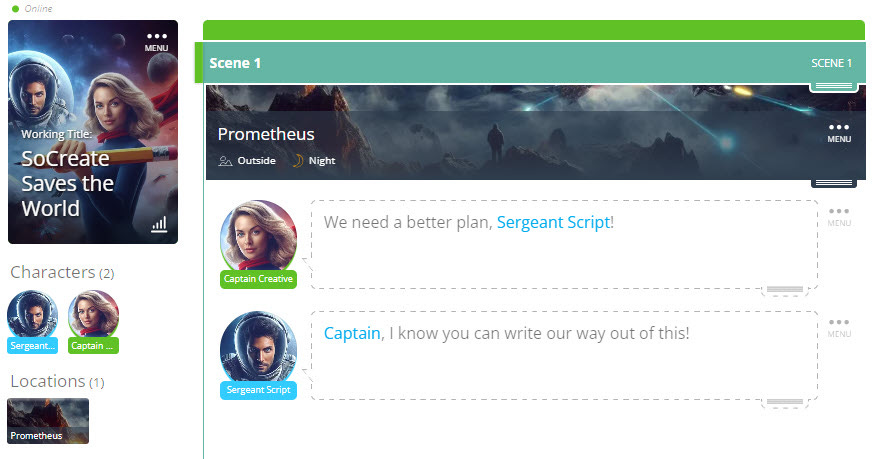
If you teach film, screenwriting, or any form of creative storytelling, you can apply to receive free SoCreate screenwriting software licenses. It's our way of supporting the digital evolution in storytelling and giving back to the community.
Applications are open until November 16, and we're hosting an online info session on November 15 at 3:15 p.m. PST. Don't miss out! RSVP here.
Our mission with this pilot is simple: empower the storytellers of tomorrow. SoCreate's software is more than just a tool; it's a transformative platform designed to tap into students' creative potential. Whether they're just starting out or already crafting their own worlds, our software is crafted to spark their imagination and bring their stories to life.
Teachers, we're looking to you to weave SoCreate into your curriculums and share your experiences. Your feedback is invaluable as we shape the future of screenwriting education together.
The buzz is real! Educators and students are already loving the energy and passion that SoCreate brings into the classroom.
This isn't just about teaching the technicalities of screenwriting; it's about inspiring a whole new generation of creative minds who will shape the future of storytelling. Imagine being part of the journey that turns today's students into the Gerwigs, Spielbergs and Peeles of tomorrow. So, let's get those creative juices flowing—apply today and join us in this storytelling adventure. Visit our application link for all the details. Let's create something amazing together!
PS: Know someone who might be interested in participating in the education pilot? Please send this information along to them!
Exploring This Week’s Featured Blogs

🚀 Transform Your Writing with SoCreate: Ready to take your screenwriting from good to phenomenal? Dive into our latest blog post where we reveal how SoCreate is revolutionizing the screenwriting game. Learn about the cutting-edge features that make writing a breeze and how you can unleash your creativity like never before. Get ready to meet your new writing partner!

🌟2023's Screenwriters to Watch: The future of film is here, and it's being written by the brightest up-and-coming talents in the industry! Our newest blog post highlights the screenwriters making waves in 2023. Discover the fresh voices and compelling stories that are setting the screen on fire this year. Who knows, you might find your next favorite writer!

😂 The Laughs Behind the Letdowns: Funniest Screenplay Rejections! Rejection is part of every screenwriter's journey, but who says it can't be a hoot? Our latest blog post is a collection of the funniest screenplay rejections that prove sometimes, you have to laugh to keep from crying. These hilarious anecdotes will not only tickle your funny bone but also inspire you to keep writing and keep smiling!
SoCreate Feature Highlight: How to Change Dialogue Type
In our continuous quest to innovate and elevate your screenwriting experience, today we’re highlighting the Dialogue Type feature in SoCreate Writer!

Dialogue Type is designed to bring a new layer of clarity and creativity to your scripts. Whether your characters are whispering voiceovers, texting rapid-fire messages, signing heartfelt conversations, or speaking in a foreign tongue, Dialogue Type ensures that every nuance of your dialogue is clear.
Easily accessible via the Dialogue Stream Item, our handy dropdown menu allows you to select the specific type of dialogue you’re crafting, from voiceovers and text messages to off-camera lines and more.
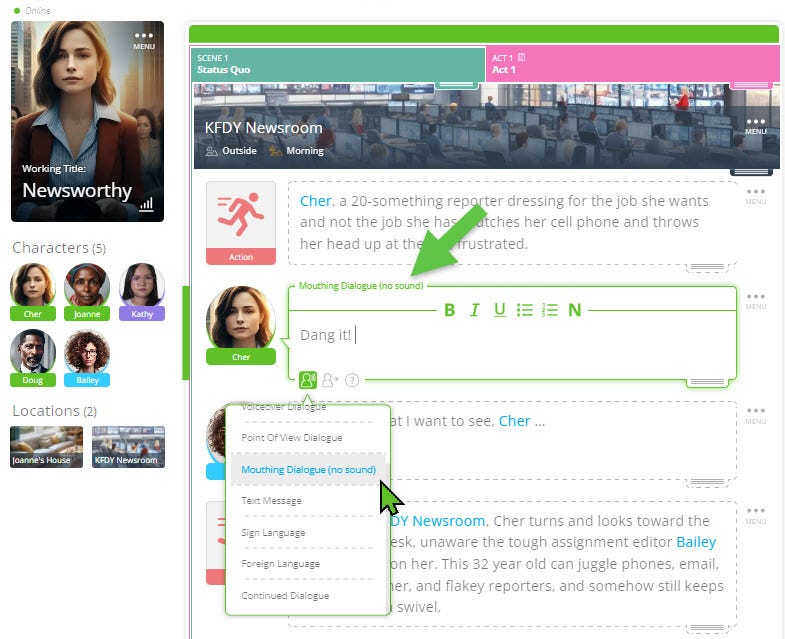
Once chosen, the Dialogue Type elegantly appears just above the Dialogue Stream Item, providing a clear and immediate visual cue. And when it’s time to share your masterpiece? Fear not! In a traditional screenplay export, the Dialogue Type seamlessly transitions to the industry-standard format, appearing in parentheses right next to your character’s name, just as the pros expect.
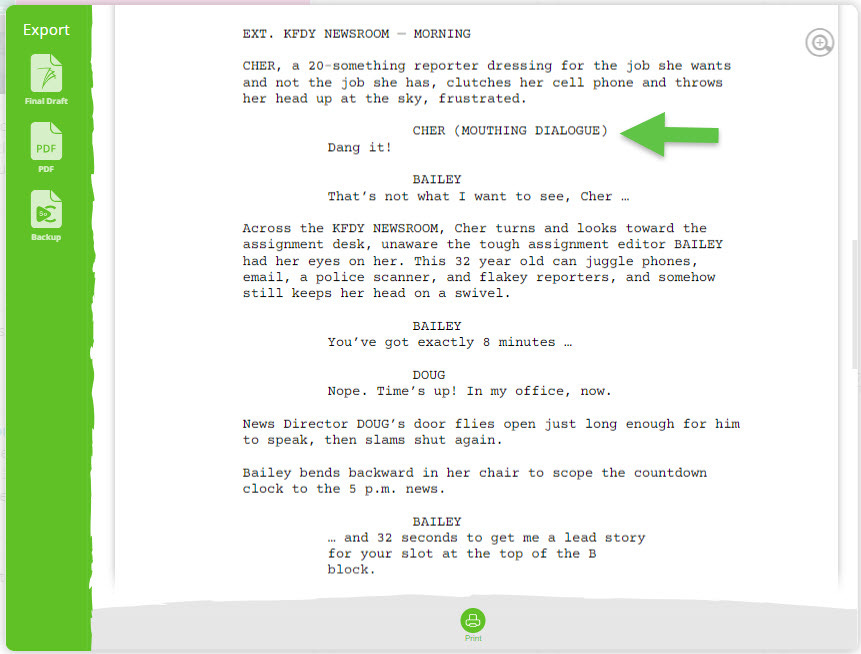
Embrace the full spectrum of dialogue possibilities with SoCreate and watch as your screenplay comes alive like never before!

Participating in SoCreate's Weekly Creative Exercises can be a fantastic strategy to kickstart your creativity and overcome writer's block in a short span of time.
This week's exercise transports you to a chilly evening outside Robin's Restaurant. The character, Sofia, is waiting impatiently, feeling stood up. How does she handle the situation when she decides to confront the person she's waiting for over the phone?
Location: EXT – Robin’s Restaurant – Night
Characters: Sofia
Scene Description: Sofia (50s) clutches her coat, teeth chattering, and pulls her phone out, irritated. Her empty table sits right behind her, inside the window that’s partially covered in frost.
Prompt: Write a one-sided phone conversation between Sofia and the person she’s calling. She feels like she’s been stood up, and she’s going to give this person a piece of her mind. But while she’s on the phone, the waiter is trying desperately to get her attention from the other side of the window. How does the phone conversation ensue?
Extra Credit: Choose one line of dialogue in your story, and change the Dialogue Type. For example, a character might deliver a line of dialogue off camera, as voiceover, or a as a text message. While you're focused within the editor on a Dialogue Stream item, you can point out Dialogue Type by clicking on the icon that looks like a person speaking. From here, choose from multiple options that give more detail about how the character is meant to deliver the dialogue. Upon previewing your story in the traditional screenplay format, this notation will appear to the right of the character's name in parentheses, just as you'd expect it to in an industry-standard script. Give it a try!
At SoCreate, we're always cheering you on, screenwriters! Let your stories soar – we've got your back every step of the way. Here's to the tales only you can tell, and the scripts that will one day light up the screen. Keep writing and keep dreaming!
See you next week,
<3 Your friends at SoCreate
Ignite your screenwriting with SoCreate, the easiest way to create a blockbuster screenplay!