
The SoCreate Weekly Museletter
Shortcuts Are Here, Create a Weekly Writing Habit, & a Webinar to Spark Your Creativity
Hello SoCreators,
Welcome to another edition of the SoCreate Weekly Museletter, your one-stop shop for screenwriting knowledge, SoCreate's latest features, stimulating challenges, and the most recent SoCreate updates.
Each week, we curate and deliver the most insightful content from the writing community right to your inbox, fostering your creativity and keeping it at its peak.
WEBINAR TOMORROW:
Embark on a Writing Escape with SoCreate!

Feel like escaping into a world of creativity? You’re invited to our upcoming webinar, Writing Escape with SoCreate - not just a showcase of our screenwriting software but an hour to dedicate to focusing on your creativity.
Here's what's in store:
Find Writing Buddies: Chat and connect with global writers. Share ideas and join a vibrant community of creatives like you.
Meet the Minds: Catch up with our founder, Justin Couto, and the SoCreate team working hard to make writing easier for you. Draw inspiration from their stories, insights, and writing exercises. Plus, hear what’s coming next!
Sneak Peek into SoCreate: Discover how our software can simplify and enliven your writing process. Find joy in writing again!
Even if the industry is on pause, your creativity needn't be. Let's make the most of this intermission together by creating creative space with SoCreate!
Ready for your creative escape? Reserve your spot for our live webinar Thursday, August 17, at 4 p.m. - 5 p.m. PST.
*All attendees will receive webinar-only pricing on SoCreate’s annual plan.*
New Feature Alert! Keyboard Shortcuts Are Here
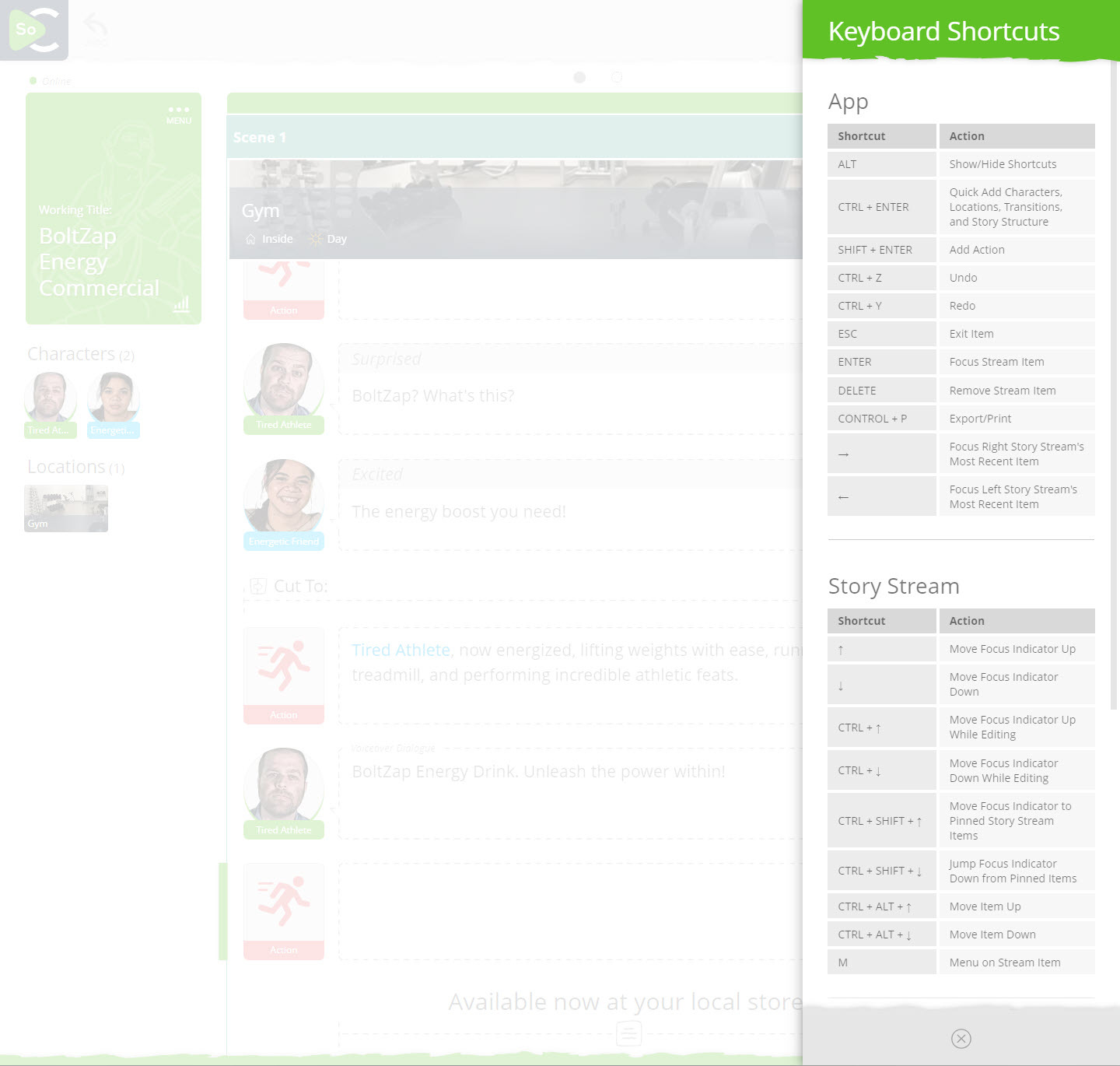
Increase your screenwriting productivity x10 with SoCreate’s newest feature, SHORTCUTS! You asked, and we’ve delivered. Now, your hands never need to leave your keyboard.
Desktop shortcuts are designed to make your writing process smoother and more efficient, allowing you to write faster than ever before, and just as fast or faster than you can currently write in legacy screenwriting software programs.
With SHORTCUTS, you can:
Shift + RETURN: Instantly insert an action block.
CTRL + RETURN: Quickly add characters, locations, transitions, and more with Quick Add.
CTRL + P: Get a preview of your story in traditional Script Format.
CTRL + Up Arrow or Down Arrow: To move from stream item to stream item in edit mode.
CTRL + SHIFT + Up Arrow or Down Arrow: To move a stream up or down the stream
ESC: Effortlessly back out of focused items.
Plus so much more!
If you just learn the above, you will be able to write as fast in SoCreate as you can in any other software.
To explore all the shortcuts, simply press the ALT key while in SoCreate Writer or click on the SoCreate Logo in the upper left to open the main menu, then click on Shortcuts.
We've worked hard to make these shortcuts as user-friendly as possible, and we're eager to hear your feedback. Give them a try and let us know how they elevate your writing experience.
Exploring This Week’s Featured Blogs

Download The Godfather Screenplay: Dive into the world of the Corleones with the downloadable PDF of "The Godfather" screenplay. Analyze the masterful storytelling and learn from one of the greatest films ever made.

How to Write a Coverage Sample: Ever wondered how to write a script coverage that stands out? This blog post guides you through the process, providing a sample and insights to help you craft compelling coverage.

Reasons Why Your Script Has Been Rejected: Rejection is a part of every writer's journey. Understand common reasons why scripts get rejected and learn how to avoid these pitfalls to increase your chances of success.
Try SoCreate, the more visual and fun way to create a professional script!
SoCreate Feature Highlight: Importing Your Story into SoCreate

In traditional screenwriting, importing a story can be a cumbersome process. It’s never seamless and you almost always need to make adjustments after the fact.
But with SoCreate, it's a breeze! Our feature allows you to import existing stories in Final Draft format into SoCreate's interactive Story Stream, making your transition smooth, effortless, and exciting as you watch your words automatically come to life with auto-selected imagery for your characters and locations.
Why is SoCreate’s Import Feature a Game-Changer?
With SoCreate, you can easily import your story from formats including Final Draft (FDX) or SoCreate Backup files. Your characters, locations, dialogue, action, transitions, and more are seamlessly integrated into our engaging visual platform. Want to edit the character and location images SoCreate automatically selected for you? It’s no problem once your story is imported into SoCreate.
This feature ensures that you can continue your writing journey with SoCreate without losing any of your previous work. It's all about making your creative process more fluid and enjoyable.
SoCreate Weekly Writing Challenge

Get ready to flex your creative muscles with SoCreate's weekly writing challenges. We provide a fresh and inventive prompt each week, pushing you to explore new dimensions in your writing.
Location: INT – Laundromat – Day
Characters: Carlos; Customer
Scene Description: A dirty laundromat in a seedy part of town. Carlos sits behind a desk in the back, counting money.
Prompt: Carlos, our superhero’s arch nemesis, is doing something very bad at this laundromat. Write a scene where we first meet Carlos as he interacts with a customer. The conversation should reveal his scheme to the audience.
Extra Credit: Use a flashback in this scene! To add a flashback, navigate to the Tools Toolbar on the right-hand side of your screen. Click "Add Transition," then choose "Story Transition." Select "Flashback" and SoCreate will insert a line into your Story Stream wherever you left your Focus Indicator. You can drag & drop this Flashback line wherever you see fit. Write your flashback, then repeat the process to add a line for "End Flashback." When you preview your script in the traditional screenplay format, your flashback will be formatted as the industry expects.
As we accompany you on your screenwriting journey, remember that creativity isn't a destination—it's an exhilarating path filled with exploration, expression, trials, victories, and, most importantly, joy! Continue to explore, learn, and write in a style that's uniquely yours!
Until next week,
<3 Your friends at SoCreate
Try SoCreate, the more visual and fun way to create a professional script!