
The SoCreate Weekly Museletter
Community Feedback is Here! + We’re Throwing a Party, and How to Write Perfect Endings
Hey SoCreators,
Hey SoCreators,
Are you tired of begging your family for feedback? Have you been yearning for a community of supportive creatives like you that you can use as a peer group for feedback on your writing? We see you, and our announcement below is for you: SoCreate Community Feedback is now available!
It’s just one tool we’re launching to give creators more power, foster a kind, collaborative community, and build a safe space to explore your creativity.
You’re our #1! And everything we do here at SoCreate is about you. Enjoy this week’s Museletter. Happy writing!
Need Feedback on Your Story? Just Ask the SoCreate Community
We’re thrilled to announce the launch of our latest feature: Community Feedback!
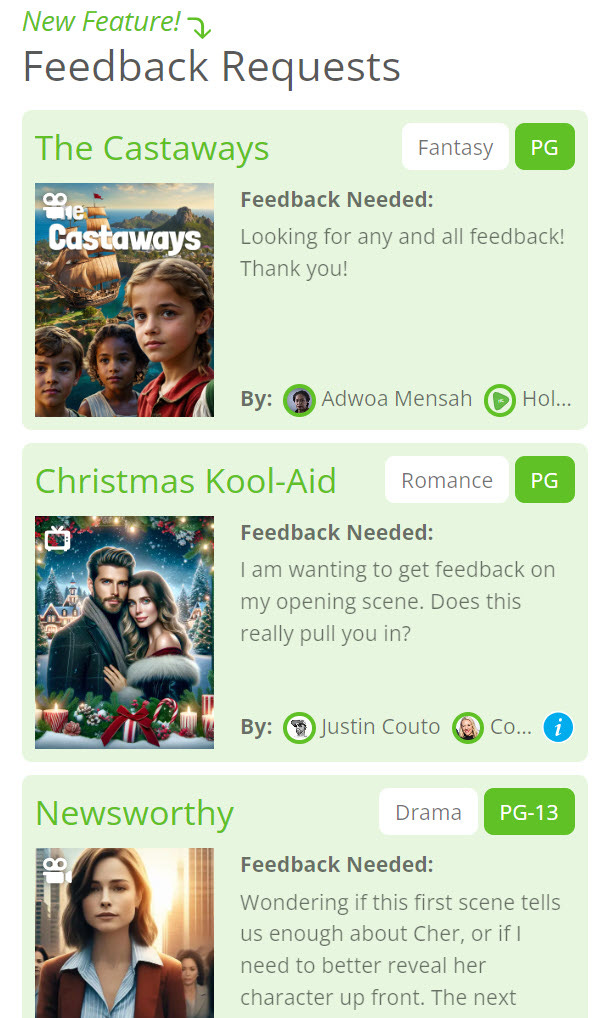
This new feature, built right into your SoCreate dashboard, allows you to share your script directly with other SoCreate members for feedback.
It’s all part of our mission to build a community of writers helping writers. And what’s better? It’s currently available in all plan tiers.
Why is Community Feedback a game-changer for writers?
Gain diverse perspectives from a wide range of voices, helping you spot strengths and areas for improvement that you might have missed.
Receive constructive criticism on exactly what you need help with by tailoring your requests.
Get motivated with positive reinforcement and build confidence in your work through supportive peer reviews.
Enhance your critical thinking by giving and receiving feedback, a valuable skill for any writer.
Connect with other writers, share ideas, and potentially spark collaborations that could lead to new creative projects.
Forget paying for feedback or making desperate pleas on other platforms for someone to read your script.
And remember, you don’t have to rely solely on the SoCreate Community for feedback. If you already share your work with another writing community, say, on Facebook or Reddit, you can generate a link to your story using our Community Feedback feature. This keeps all your notes in one place.
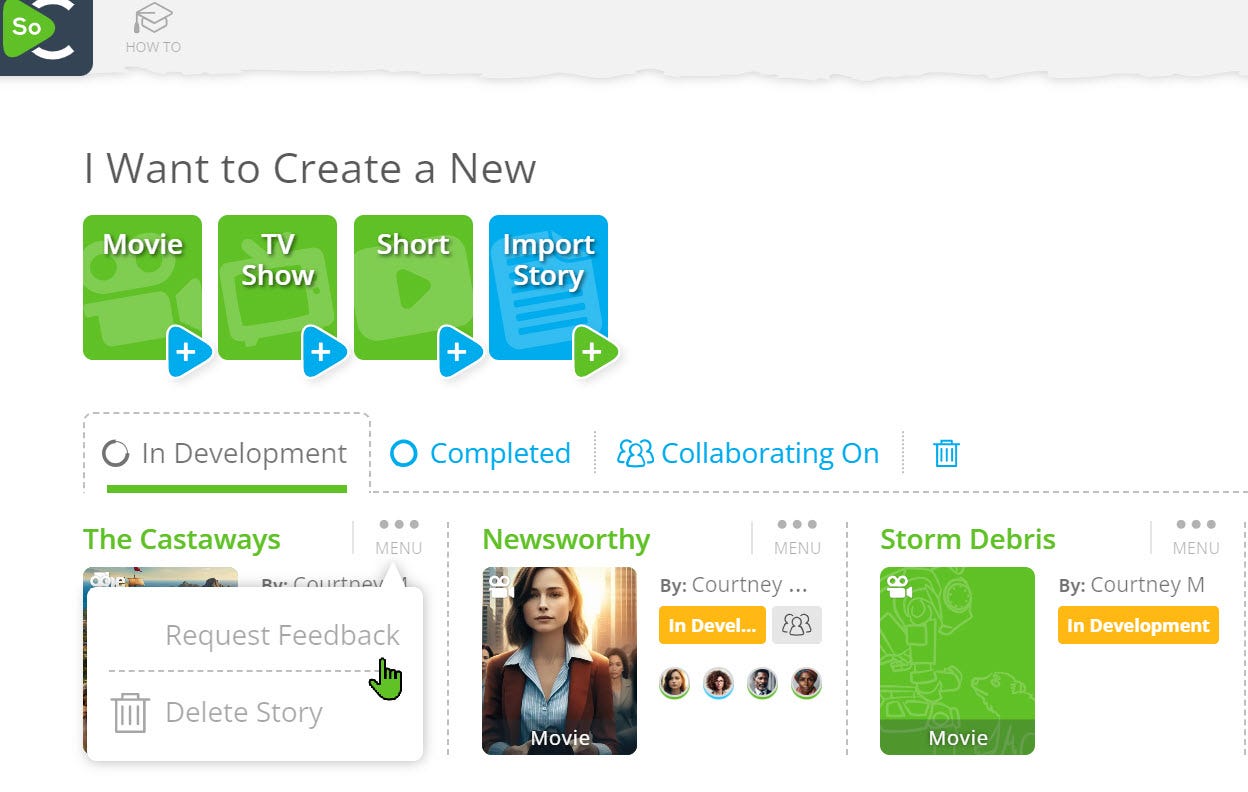
Ready to elevate your script? Here’s how to start requesting feedback today.
Open the story you want to share.
Click the sharing icon in the upper right-hand corner.
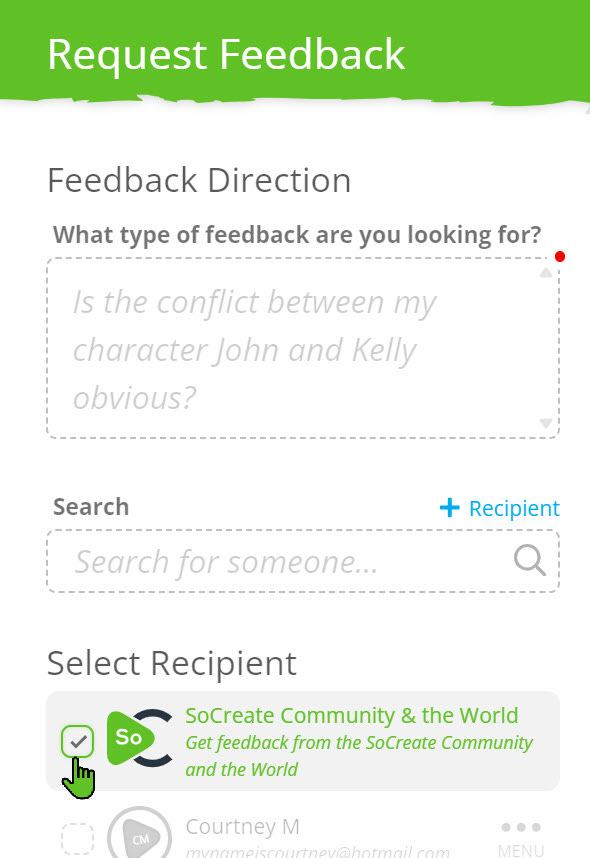
Click “Request Feedback” and then “Select Recipient: SoCreate Community & the World.”
Your Story will be added to the Community Feedback panel in every SoCreate writer’s dashboard, where writers can start giving feedback right away!
ICYMI: Transfer Story Ownership in SoCreate
We’re excited to introduce a highly requested feature from our members: Transfer Story Ownership! This new tool allows for seamless transitions of project ownership among collaborators, ensuring that your creative process remains smooth and flexible.
Transfer Story Ownership
In SoCreate, every collaborator's contributions are meticulously tracked, and their names appear on the title page with a “written by” credit. Now, with the Transfer Story Ownership feature, you can easily reassign story ownership to a collaborator. Here’s why you might want to use this feature:
Project Continuity: If you're stepping away from a project but want it to continue under new leadership.
Team Restructuring: When a project shifts hands due to changes in collaborator roles or responsibilities.
Recognition Adjustment: To accurately reflect the main contributor’s role when a story evolves under new guidance.

How to Transfer Story Ownership
If you’re the original creator of a SoCreate Story and wish to transfer ownership, follow these steps:
Navigate to your story and click the “Sharing” icon in the upper right corner of SoCreate Writer.
Click “View Collaborators.”
Use the three-dot menu icon next to each collaborator’s name to access “Transfer Ownership Settings.”
You’ll have the following options:
Keep Contributions Intact: Transfer ownership while keeping your contributions visible, ensuring your work is still acknowledged.
Override Your Contributions: Make it appear as if all of your contributions were made by the new story owner.
This feature enhances collaboration flexibility, allowing for dynamic shifts in story management while preserving or adjusting contribution credits as needed.
Try out this new feature and streamline your creative projects with ease!
You’re Invited to SoCreate’s Official Launch Party
If you’re anywhere near San Luis Obispo, California on August 29, we hope you’ll join us to celebrate the official launch of SoCreate’s complete software vertical, including SoCreate Writer, SoCreate Feedback, and SoCreate Storyteller.

For the first time ever, we’re inviting storytellers to our physical headquarters to experience our incredible space that celebrates storytellers of the world with floor-to-ceiling, photo-realistic, hand-painted murals decking every wall.
We’ll also be celebrating YOU, the storytellers who will be able to bring their stories to life using SoCreate Storyteller, our revolutionary publishing platform that empowers you to share your stories with the world. To learn more about Storyteller, including why you should start preparing for this platform NOW, click here.
Want to come party with us?
When: August 29, 2024, 5:30 p.m. - 9:30 p.m.
Where: SoCreate Headquarters (see address in RSVP)
Exploring This Week’s Featured Blogs

How to Write Characters in Your Script That People Can’t Get Enough Of
Creating characters that captivate and resonate with audiences is key to a successful screenplay. This blog offers practical tips to help you develop characters with depth, relatability, and unforgettable arcs that drive your story forward.

Why It’s Important to Stay Inspired (Even If You’re Not Selling Any Screenplays)
Writing can be a long and challenging journey, especially when you're not seeing immediate success. From storyteller and podcaster Bryan Young, learn why staying inspired is crucial to your growth as a writer and discover ways to keep the creative fire burning, no matter where you are in your career.

5 Steps to Write a Perfect Ending in Your Screenplay
A great ending can leave a lasting impression on your audience. This blog breaks down five essential steps to crafting the perfect conclusion to your story, ensuring your screenplay ends on a high note that satisfies and surprises.
SoCreate’s Weekly Writing Challenge
Are you ready to flex your writing muscles and establish a regular writing habit? Commit to our weekly writing challenges! Simply read the prompt, click "Accept the Challenge," and you'll be directed to SoCreate Writer to start crafting your story straight away.
Our writing challenges are perfect for sharpening your skills, exploring different genres, and sparking your creativity. Remember, there's no pressure here—it's all about personal growth and enjoyment.
Remember, SoCreate now offers FREE plans, so there’s no excuse to not take the challenge each week 😊
This week, a massive storm has swept through town, bringing with it more than just heavy rain.

Location: Outside (EXT) – Small Town, USA
Characters: Alex (30, weather scientist), Emily (25, local barista)
Set the Scene: A powerful storm rages through the small town, leaving the usually bustling town square deserted. Amid the chaos, Alex, a weather scientist, spots something strange—a massive, ancient-looking ship has appeared in the town square.
Prompt: Emily, caught in the storm, stumbles upon the ship and calls for help. Alex arrives, and together they try to unravel the mystery of where the ship came from. Just as they begin to investigate, they hear a loud creaking noise from the ship… followed by a deep, echoing roar from within.
That's it for this week's Museletter! We hope it inspired you to write. Your stories are important, and every sentence you add brings you one step closer to a finished story you can share with the world!
<3 Your friends at SoCreate
Level up your creativity with SoCreate, the easiest way to create a blockbuster screenplay!