
The SoCreate Weekly Museletter
20 Scene Ideas, a New Feature to Make Writing Super Fast, and a Fresh New Writing Challenge!
Hello SoCreators,
Welcome back to the SoCreate Weekly Museletter, where we bring you the latest in screenwriting insights, innovative features, exciting challenges, and updates from the SoCreate universe. Let's dive into a world of creativity and storytelling together!
New Feature Alert! Keyboard Shortcuts Are Here
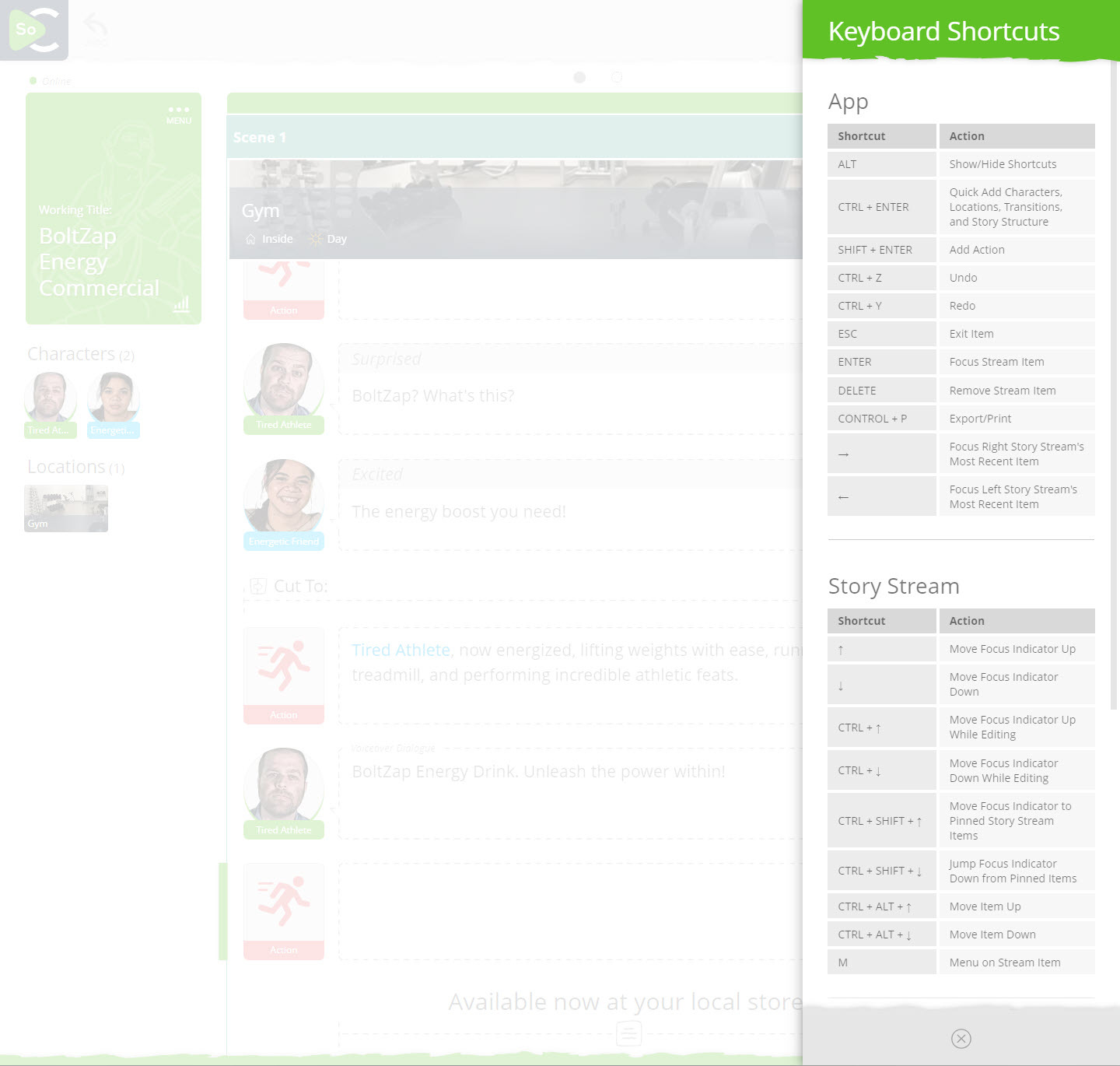
Increase your screenwriting productivity x10 with SoCreate’s newest feature, SHORTCUTS! You asked, and we’ve delivered. Now, your hands never need to leave your keyboard.
Desktop shortcuts are designed to make your writing process smoother and more efficient, allowing you to write faster than ever before, and just as fast or faster than you can currently write in legacy screenwriting software programs.
With SHORTCUTS, you can:
Shift + RETURN: Instantly insert an action block.
CTRL + RETURN: Quickly add characters, locations, transitions, and more with Quick Add.
CTRL + P: Get a preview of your story in traditional Script Format.
CTRL + Up Arrow or Down Arrow: To move from stream item to stream item in edit mode.
CTRL + SHIFT + Up Arrow or Down Arrow: To move a stream up or down the stream
ESC: Effortlessly back out of focused items.
Plus so much more!
If you just learn the above, you will be able to write as fast in SoCreate as you can in any other software.
To explore all the shortcuts, simply press the ALT key while in SoCreate Writer or click on the SoCreate Logo in the upper left to open the main menu, then click on Shortcuts.
We've worked hard to make these shortcuts as user-friendly as possible, and we're eager to hear your feedback. Give them a try and let us know how they elevate your writing experience.
Exploring This Week’s Featured Blogs

Top 10 Rom-Com Quotes and the Screenwriters Who Wrote Them: Fall in love with the words behind your favorite romantic comedies. Discover the screenwriters who penned these iconic lines and get inspired!

How to Write Slapstick Comedy: Want to tickle your readers' funny bones? Learn the art of slapstick comedy writing and bring laughter to your scripts.

20 Scene Ideas for Your Movie, TV Show, or Book: Stuck in a creative rut? Explore these 20 fresh scene ideas to spark your imagination and get your story flowing again.
Try SoCreate, the more visual and fun way to create a professional script!
SoCreate Feature Highlight: Editing Transitions in SoCreate

Screenplay transitions are essential in storytelling. Transitions help explain to readers what they’ll see on screen as you move from one part of your story to the next.
In a traditional screenplay, transitions are typically noted to the far right of your script page, making them easy to miss.
But in SoCreate, transitions appear within your Story Stream in the reader’s field of view. This way, they’re part of the reading experience. Upon previewing or exporting your story to the traditional screenplay format, transitions appear where the industry expects.
Just like every Stream Item in SoCreate, Transitions are easy to edit and move around. Just use the three-dot menu icon to the right of your transition. Click “Edit Transition” to change the item to another transition within that transition type. For example, you can change a camera transition of “CUT TO” to a different camera transition of “ANGLE IN.” Or, change the Transition Type altogether by clicking “Change Transition” from the same three-dot menu icon. From here, you could change the Camera Transition to a Story Transition, Text on Screen, or Passage of Time.
Enjoy the flexibility of customizing transitions to suit your unique storytelling style.
SoCreate Weekly Writing Challenge

Ready for a new adventure in writing? Join SoCreate's weekly writing challenges and push your creativity to new heights.
Location: EXT – Outdoor Marketplace – Day
Characters: Amar; Navi
Scene Description: Amar (18) and Navi (21) rush through crowds of people doing their daily grocery shopping, clueless to the chase that’s ensuing. The brothers look back to see if they’re still being followed. Amar sees that Navi is clutching an item tightly.
Prompt: Write an action scene describing Amar and Navi attempting to escape someone chasing them. Why are they being chased, and does it have anything to do with what Navi is holding?
Extra Credit: Use SoCreate's Notes feature to add notes to yourself about what will take place in each Action Stream Item before you start writing. For example, you could write a Note to yourself that says "Amar needs to throw something to Navi here," if you don't yet know what he will throw. Or "Should Navi make a gesture here?" To make a note, simply click the 'N' in any Action Stream Item editor. Doing so will change everything you write to highlighted blue text while you're in this mode, so you can quickly differentiate Notes from other text. Learn more about using Notes here.
As we accompany you on your screenwriting journey, remember that creativity is not just a goal to reach but a thrilling adventure filled with discovery, growth, and joy. Keep exploring, learning, and writing in your unique voice!
Until next week,
<3 Your friends at SoCreate
Try SoCreate, the more visual and fun way to create a professional script!