
The SoCreate Weekly Museletter
Silhouettes, Story Structure, and Your SoCreate Weekly Writing Challenge!
Hello SoCreators,
This week's Museletter is packed with new features, essential blogs, and a writing challenge you won't want to miss. Let's get right to it!
Ignite your screenwriting with SoCreate, the easiest way to create a blockbuster screenplay!
New Feature Alert: The SoCreate Silhouette Collection
Writers, we've got exciting news for you! We're expanding your creative arsenal with our brand-new Silhouette Collection, now available in SoCreate’s Character Image Gallery.
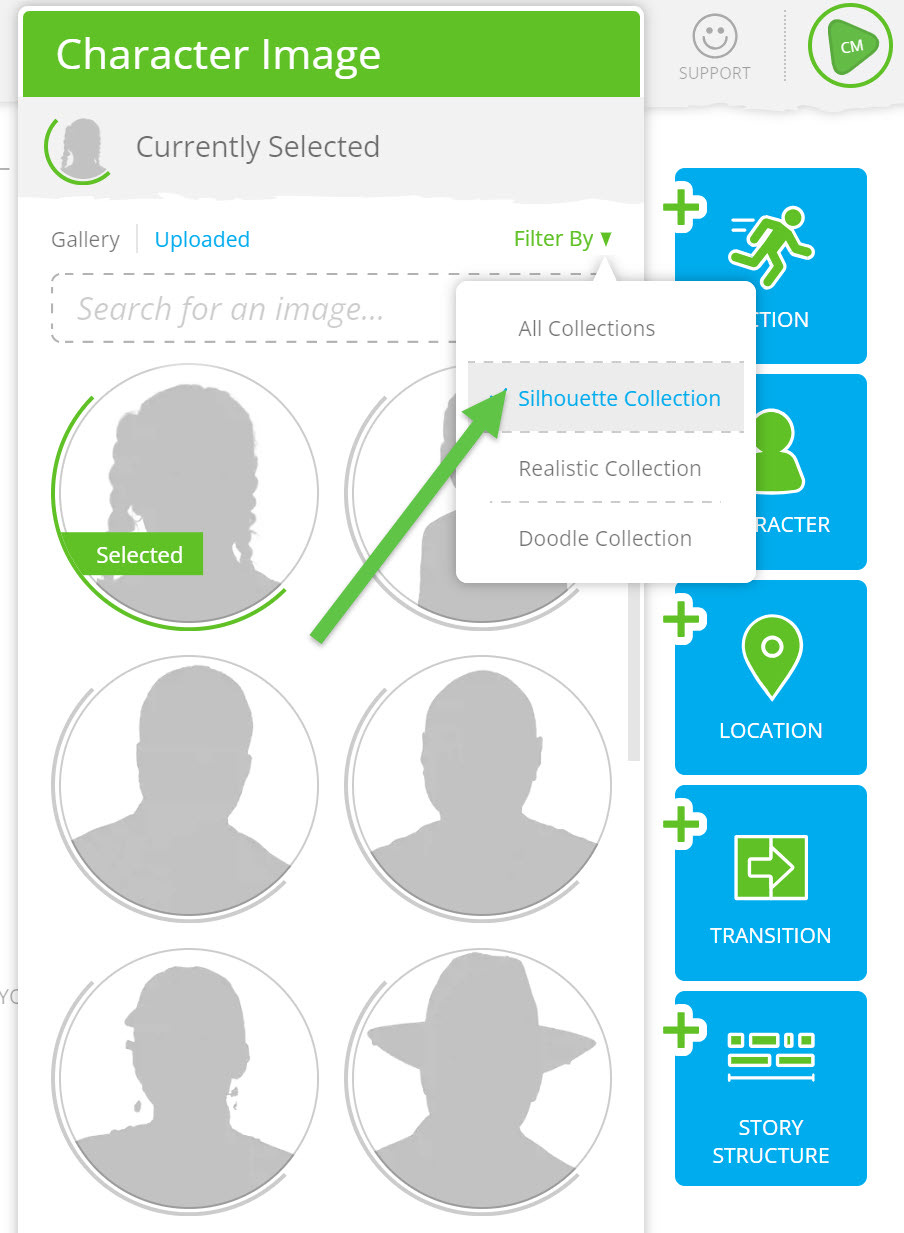
Ever found yourself unsure of the perfect image for your Character? Or perhaps, you want to leave it to the reader's imagination? Our Silhouette Collection is the answer. This image gallery collection is crafted to offer a more ambiguous representation of your Characters, giving you the flexibility to either finalize a character's image later or allow readers to visualize characters on their terms.
Here’s the lowdown …
Variety: The Silhouette Collection joins our already popular Realistic and Doodle Collections. Now you have three dynamic galleries to explore and utilize for Characters and Locations!
Flexibility & Clarity: Silhouette images provide a general yet distinct shadow outline. While they're less specific, they remain recognizable in your Story Stream, streamlining the editing and skimming processes.
Tailored to You: Remember, if none of our image gallery collections quite hit the mark, you can always upload your personalized images for Characters, Locations, and Action. Customize your writing experience to suit your unique style.
Enhance Your Writing Journey: Just a heads-up, while these images elevate your SoCreate writing experience, they won't appear in the exported traditional screenplay format. These visuals are designed to ignite your creativity, help you visualize better, motivate you to revisit your drafts and maintain an immersive writing session. Consider them as creative catalysts rather than final screenplay elements.
Dive in and explore the Silhouette Collection today. Let's keep those creative juices flowing!
SoCreate, Now Available in Dutch!
We're thrilled to announce that SoCreate is now available in Dutch, making it the tenth language added to our platform. We're committed to empowering writers worldwide, and with this update, we're ensuring even more storytellers can craft their stories using SoCreate's tools in their native tongue. Here's to breaking language barriers and fueling creativity across borders!
To access SoCreate in Dutch, click here.
Exploring This Week’s Featured Blogs

Mastering Screenplay Elements: Unlock the secrets of crafting a compelling screenplay. Our latest blog post breaks down real-world examples of screenplay elements to guide your writing journey. Want to write with precision and clarity? Dive into these essential insights now! Read More.

Screenplays vs. Plays: Ever wondered about the nuances that set screenplays apart from stage plays? Delve into our comprehensive comparison that highlights the key differences and unique attributes of both mediums. Expand your understanding and versatility as a writer! Discover the Differences.

Texting on Screen: In the digital age, portraying text messages in screenplays is more relevant than ever. Learn the ins and outs of effectively incorporating text messages into your script, ensuring they drive your story forward while staying authentic to modern communication. Get the Tips.
Ignite your screenwriting with SoCreate, the easiest way to create a blockbuster screenplay!
SoCreate Feature Highlight: How to Edit Story Structure
Story Structure is your secret weapon when crafting compelling stories that keep pace, take audiences on an emotional journey, and keep us rooting for your characters to achieve their goals.
In SoCreate, adding and leveraging Story Structure is so simple. Think of Story Structure as the bones of your screenplay, or the frame of a house. You can use it to stack up an outline, and then fill in the story afterward.
One very helpful way to leverage SoCreate’s Story Structure is to edit each Story Structure element, like Acts and Scenes, so you can keep track of what’s happening and where.

By editing Story Structure, you can name your Acts and Scenes, and even add notes to yourself within each structure heading to remind yourself of what needs to happen in each part of your Story.
Simply click on the heading of any Story Structure item to add details, or use the three-dot menu icon within any Story Structure item. Click anywhere outside the Story Structure item to finalize the change.
Story Structure items that contain notes will now contain a small “N” in the upper right corner to remind you of the notes on that Act, Sequence, or Scene.

Fuel your creativity and push your boundaries with our weekly writing challenges. Each prompt is designed to stretch your imagination and hone your screenwriting skills. Dive in, and remember, there's a new challenge waiting for you every week!
Location: INT – The Family Beach House – Evening
Characters: Cori; Drew; Juliana; Chris
Scene Description: The family dinner is progressing smoothly, with Drew (22) passing the mashed potatoes to his sister Cori (32). Middle sister Juliana (30) is about to take a sip of wine when a knock at the door and the sight of Chris standing there makes her nearly spit it out.
Prompt: Who is Chris to these three siblings? His presence triggers an immediate negative reaction from Juliana and Cori towards Drew, leading to a full-blown food fight. Write a scene that describes the exchange of actions and words between the siblings as Chris stands outside the door, watching in surprise.
Extra Credit: Use Scene Notes to add notes to yourself about what you plan to have take place in your Weekly Challenge scene before you start writing! For example, you could copy and paste the challenge details above into your Scene heading so you don’t have to refer back to this email. You can also create Characters in your Scene Notes and describe who will appear and what they will be doing in your scene. To do this, use the Quick Add feature by typing the ‘@’ symbol, tab down to the Character icon, and add Character details such as name (Drew), age (22), and type (male). You can create a bulleted list of every Character who will appear in your Scene within the Scene Notes heading and describe what each will be doing.
Just a quick reminder: we're here to back you up in your pursuit of screenwriting success. Your stories matter, and we're in your corner, rooting for you!
See you next week,
<3 Your friends at SoCreate
Ignite your screenwriting with SoCreate, the easiest way to create a blockbuster screenplay!