
The SoCreate Weekly Museletter
Feedback Made Simple, Produce an Unforgettable Podcast, and an Exclusive Peek into the Story Process at Pixar
Hey SoCreators,
In the US, we’re coming up on a three-day weekend. How will you spend your time? If you’re not working, we hope you’ll squeeze in an hour or two of writing with your extra day off.
Peruse through this week’s Museletter for all the inspiration you’ll need!
Product Update: SoCreate’s Story Stream is Now Bigger & Better Than Ever!
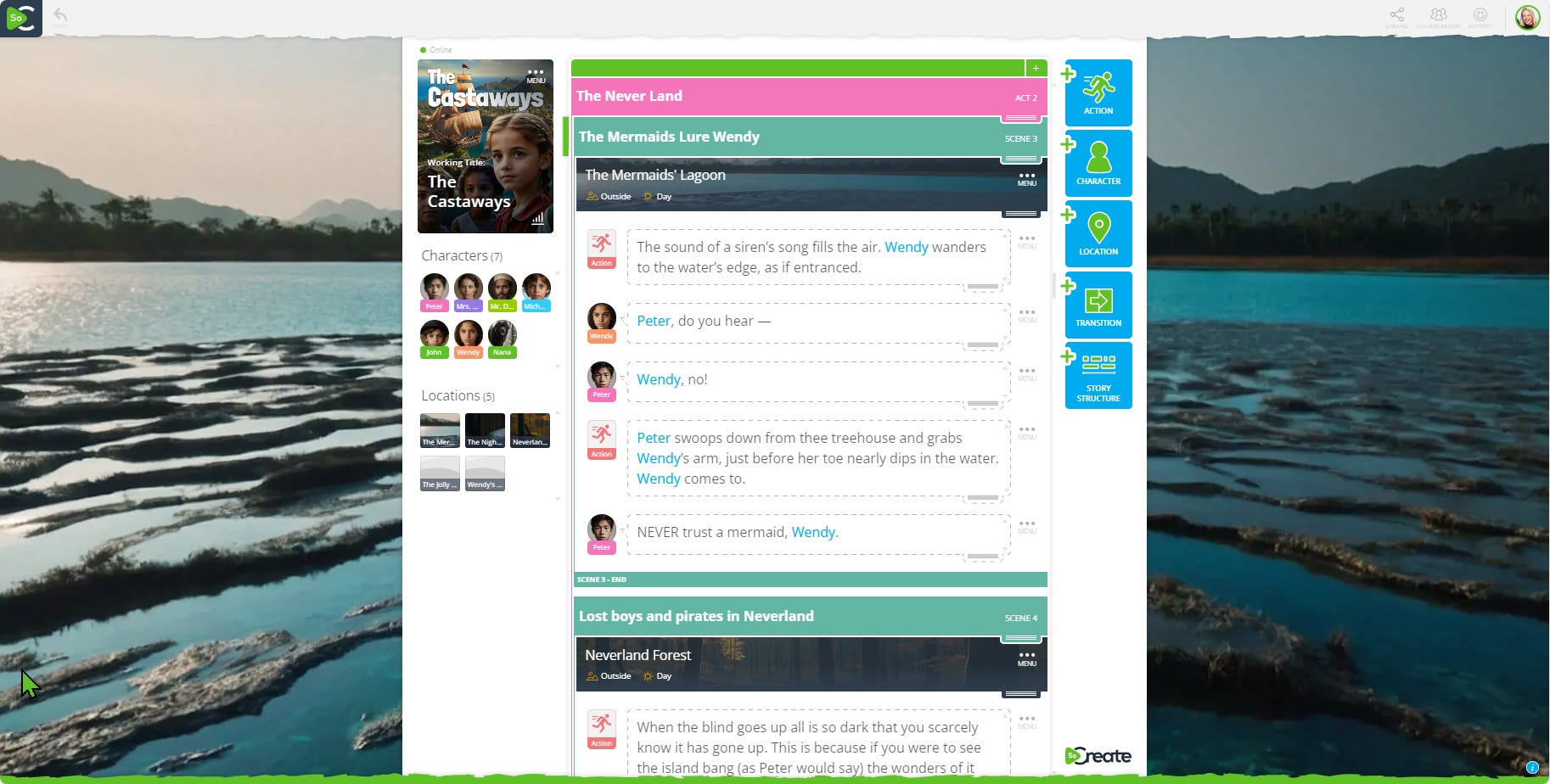
Based on member feedback, we’ve made a big improvement to our software that will enhance your focus and lessen distractions while you write. And we could all use more of that!
The Story Stream is now centered, rather than the writing area being offset to the left side of your screen.
The Story Stream is now wider than ever, better mimicking the width of a traditional page.
Adding additional Story View columns no longer takes up a big portion of your screen.
Location images now fill the background of your screen, making your writing experience even more immersive than ever before!
Thank you to everyone who chimed in, and know this: We listen, we devise a plan, and we make changes based on what's best for YOU. So, never hesitate to reach out to us with suggestions at YourFriends@SoCreate.it.
Happy writing!
Exploring This Week’s Featured Blogs

3 Skills to Hone to Produce an Unforgettable Narrative Podcast
Thinking about creating a narrative podcast? Our latest blog covers the three essential skills you need to master to produce a podcast that captivates and engages your audience. Learn how to elevate your storytelling and make your podcast stand out!

Film Synopsis Examples
Crafting a compelling film synopsis is crucial for pitching your story. Check out our blog for examples of effective film synopses and tips on how to write your own. Make sure your synopsis grabs attention and conveys the essence of your story.

The Story Development Process at Pixar
Ever wondered how Pixar creates its unforgettable stories? Our blog delves into the story development process at Pixar with Lorien McKenna, a storyteller who spent years in Pixar’s story department. She offers insights and inspiration from one of the most successful animation studios in the world. Learn from the best to enhance your own storytelling techniques.
SoCreate Feedback: The Easiest Way to Get Feedback on Your Screenplay
ICYMI: SoCreate Feedback is now available for Professional Plan members! This brand new feature allows you to share any portion of your script and effortlessly collect comments on it via a simple sharing link. Reviewers can see your script and comment on it easily from any device; no SoCreate account is required.
Forget the hassle with PDFs, handwritten notes, or multiple versions of your screenplay with notes from different people.
SoCreate Feedback is the new way!
TODAY: Master SoCreate and Revolutionize Your Screenwriting Process!
In just 45 minutes, you can learn the exact steps you need to take to write your first script in SoCreate. We’ll show you how in our webinar this afternoon!
This free session is for current and future members and any writers still deciding whether to switch to a new screenwriting software.
We hear this often:
“Well, my screenwriting software works perfectly fine. I don’t want to take the time to learn something else.”
But what if changing your software is exactly what your screenwriting process needs?
See your stories with fresh eyes and harness the power of a fully digital, visual writing tool to improve your writing skills.
In 45 minutes, you’ll be equipped with everything you need to start writing right away.
🗓️ TODAY, Wednesday, May 22
⏰ 4 p.m. - 5 p.m. PST
Week 21: Let’s Write a Screenplay in 2024!
Welcome to week 21 of our journey to write a screenplay in 2024! This week, we're moving on to the crucial step of incorporating all the feedback you've received on your script. Feedback is invaluable in refining your story and taking it to the next level. Here's how to make the most of it.

Step 1: Evaluate the Feedback
Not all feedback is created equal, so it's important to assess the source and the content:
Consider the Source: Consider who provided the feedback. Is it from a trusted friend, a professional script consultant, or a fellow writer? Their level of expertise and familiarity with your work can impact the relevance of their notes.
Look for Patterns: Pay attention to common themes or repeated comments. If multiple reviewers mention the same issue, it's likely an area that needs attention.
Weigh the Impact: Determine which feedback will have the most significant impact on your story. Prioritize changes that enhance your script's structure, character development, and overall coherence.
Step 2: See the Note Through the Note
Understanding the underlying concern behind each note is crucial:
Identify Core Issues: If feedback points out that a scene is boring, consider what might be missing. Is it lacking tension, stakes, or emotional depth?
Ask Questions: Reflect on why a particular note was given. Does it point to a deeper problem in the story or character arcs?
Think Holistically: Consider how changes based on feedback will affect the script as a whole. Ensure that adjustments align with your overall vision and theme.
Step 3: Make Thoughtful Revisions
Once you've evaluated the feedback, it's time to make revisions:
Prioritize Changes: Start with the most critical feedback that will enhance the story's core elements.
Be Open to Rewriting: Some feedback might require substantial changes, including rewriting scenes or rethinking character motivations. Embrace these opportunities to improve your script.
Iterate and Test: After making changes, test them out. Read through your revised script, or better yet, have a table read with friends or colleagues to see how the changes play out.
Using SoCreate Feedback
If you're using SoCreate Feedback, the process is even more streamlined:
Centralized Feedback: All comments are collected in one place, making it easy to review and manage feedback.
Easy Replies: Respond to feedback directly within the platform, fostering a productive dialogue with your reviewers.
Incorporating feedback is a critical phase where your script can evolve significantly. Embrace the feedback, apply the necessary changes, and watch your screenplay come to life in new and exciting ways!
For anyone new to our challenge, it’s never too late to join!
SoCreate’s Weekly Writing Challenge
Are you ready to flex your writing muscles and establish a regular writing habit? Dive into our weekly writing challenges! Simply read the prompt, click "Accept the Challenge," and you'll be directed to SoCreate Writer to start crafting your story straight away.
Our writing challenges are perfect for sharpening your skills, exploring different genres, and sparking your creativity. Remember, there's no pressure here—it's all about personal growth and enjoyment.
This week, test your comedic chops with this chaotic prompt.

Location: Exterior (EXT) – City Park
Characters: Priya (20s, event coordinator), Jamal (30s, food vendor)
Set the Scene: The city park is alive with the sights, sounds, and smells of a lively festival. Priya is running around with a clipboard, trying to keep everything on schedule. Jamal is setting up his food truck, preparing for the crowd.
Prompt: As the festival kicks off, Priya discovers that the entertainment lineup has been mixed up, causing chaos. Meanwhile, Jamal realizes that his food supplies have been swapped with another vendor’s exotic ingredients. How do Priya and Jamal handle these comedic challenges while trying to make the festival a success? Write a scene that highlights the humorous chaos and their creative problem-solving.
That's it for this week's Museletter! We hope it inspired you to write. Your stories are important, and every sentence you add brings you one step closer to a finished story you can share with the world!
<3 Your friends at SoCreate
Level up your creativity with SoCreate, the easiest way to create a blockbuster screenplay!