
The SoCreate Weekly Museletter
SoCreate Weekly Museletter: Pilot Program Reminder, Screenwriting Innovators, and New Slug Line Features!
Hello SoCreators!
Kickstart your week with our latest Museletter! Dive into exciting SoCreate news, must-read blogs, and a fresh new writing challenge that's calling your name. Ready to jump in? Let's go!
REMINDER: Education Pilot Program Info Session TODAY!
Here to remind you that SoCreate's exclusive pilot program for high school and middle school educators is launching, and today is a pivotal day for those interested in joining!
Today's Online Info Session - Don't Miss It:
When: This afternoon, November 15, at 3:15 p.m. PST
RSVP Now: Secure your spot for the session here.
If you're an educator in film, screenwriting, or any creative storytelling field, this is your chance to get free access to SoCreate screenwriting software. This initiative is part of our commitment to fostering digital innovation in storytelling and supporting our educational community.
Deadline Alert: Remember, applications close on November 16. So, act fast!
Why Join Our Pilot Program?
Empower Tomorrow's Storytellers: SoCreate is more than a tool; it's a catalyst for creativity, designed to unlock students' storytelling potential.
Integrate and Innovate: We invite teachers to incorporate SoCreate into their curriculum and share their journey with us. Your insights are crucial in shaping the future of storytelling education.
Be a Part of the Story: Join a community that's already experiencing the vibrancy and inspiration SoCreate brings to classrooms. This is about more than teaching screenwriting basics; it's about igniting the creative spark in the next generation of storytellers.
Imagine playing a role in guiding today's students to become the Gerwigs, Spielbergs, and Peeles of tomorrow. Let's turn this vision into reality. Apply now, join us in this afternoon's info session, and embark on an exciting storytelling adventure!
PS: Know someone who might be interested in participating in the education pilot? Please send this information along to them!
Exploring This Week’s Featured Blogs

Breaking the Mold: 2023's Screenwriting Innovators Discover 2023's Game-Changing Screenwriters
The film industry is witnessing a revolution, led by some of the most innovative minds in screenwriting this year. Our featured blog post shines a spotlight on the trailblazers who are redefining storytelling in 2023. Dive into the stories of these creative geniuses and get inspired by their groundbreaking approaches.

Mastering Feature Film Writing with SoCreate: A 5-Step Guide to Writing a Feature Film
Ever wondered how to craft a compelling feature film script? Look no further! Our insightful blog post provides a step-by-step guide on using SoCreate Screenwriting Software to bring your feature film ideas to life. From concept to final draft, discover the secrets to successful screenwriting and start your journey to becoming a master storyteller.

The Power of Perseverance in Writing: Why You Should Never Give Up on Your Writing Dreams
Every writer faces challenges, but the key to success is never giving up. Our latest blog post explores the importance of perseverance in the writing journey. Read inspiring stories of writers who overcame obstacles and learn why holding onto your writing dreams is essential. This motivational piece is a must-read for anyone needing a boost to keep pursuing their passion for writing.
New in SoCreate: Special Instance Slug Line Formatting
We're excited to announce enhancements to our slug line feature in SoCreate, offering more flexibility and precision in customizing your scene headings!
Understanding Traditional Slug Lines: Typically, a slug line (or scene heading) includes:
INT or EXT: Indicating whether the scene is inside (INT) or outside (EXT).
Location Name: The specific place where the scene occurs.
Time of Day: This helps the production team plan for lighting needs and shooting constraints.
New Customizable Options in SoCreate:
Inside/Outside (INT./EXT.): Ideal for scenes transitioning between interior and exterior settings. For instance, a scene might start inside a car (INT.) and then switch to an external view of a train approaching (EXT.). In SoCreate, you can now use "Inside/Outside" to seamlessly indicate this transition.
No Setting: Useful for subheadings within a scene. Imagine you have a master scene heading like "Inside – Sarah’s House – Day" (exported as INT. – SARAH’S HOUSE – DAY). If you want to specify a particular room in Sarah's house, you can use "No Setting – Bedroom – No Time Set" (exported as BEDROOM). This tells the reader that the action has moved to a specific location within the broader scene, without repeating the overall setting and time.
No Time Set: Choose this when the time of day is not important to the scene, such as in a setting where time is irrelevant (like outer space).
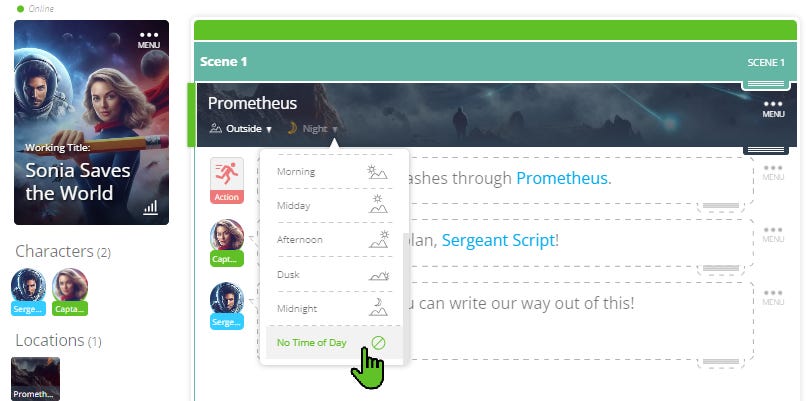
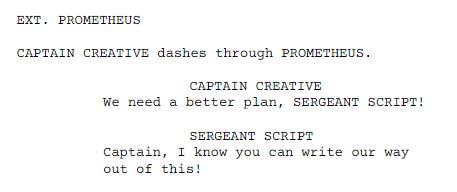
These new options in SoCreate provide you with greater control over how your scenes are visualized and understood, ensuring clarity and precision in your storytelling! Access these new options from within any Location Stream Item by clicking the dropdown menus.

Participating in SoCreate's Weekly Creative Exercises can be a fantastic strategy to kickstart your creativity and overcome writer's block in a short span of time. We hope you’ll participate each week to hone your skills and get some writing time in!
Location: Inside (INT) – Jodie’s Kitchen – Morning
Characters: Jodie; Ken
Scene Description: Jodie (45) and Ken (45) hold hands across the small, round kitchen table. Jodie wears a knitted beanie to cover her balding head. Ken stares down at the table blankly, depressed.
Prompt: Write a scene where Jodie reveals that she doesn’t want to wait any longer to really live out her dreams. She announces to Ken that she’s going to take on her bucket list and reveals three absurd things she wants to accomplish before her cancer takes over. What does she want to do, and how does Ken react?
Extra Credit: Create new characters, locations, and props using SoCreate's Quick Add Tool! Type the ‘@’ sign to open the Quick Add Tool, then tab to the "Add Character", "Add Location", or "Add Prop" pane to create one. This item is now saved in your Story Toolbar for quick, one-click access whenever you want to insert it into your Story Stream.
At SoCreate, we're always cheering you on, screenwriters! Let your stories soar – we've got your back every step of the way. Here's to the tales only you can tell, and the scripts that will one day light up the screen. Keep writing and keep dreaming!
See you next week,
<3 Your friends at SoCreate
Ignite your screenwriting with SoCreate, the easiest way to create a blockbuster screenplay!