
The SoCreate Weekly Museletter:
New Feature Alert, Screenwriting Insights, and a New Writing Challenge!
Hello SoCreators,
Welcome to another edition of the SoCreate Weekly Museletter, your one-stop shop for screenwriting knowledge, SoCreate's latest features, stimulating challenges, and the most recent SoCreate updates.
Each week, we curate and deliver the most insightful content from the writing community right to your inbox, fostering your creativity and keeping it at its peak.
Exciting New Feature: Quick Add
We're thrilled to present our innovative new feature that keeps your hands on the keyboard – The Quick Add. By typing the '@' symbol, you can now instantly add character and location mentions to your dialogue, action, or notes in a single tool. Once it is open, you can also use your tab key to navigate to the add character or add location tab to create new characters and locations effortlessly.
Tagging Characters and Locations Using '@'
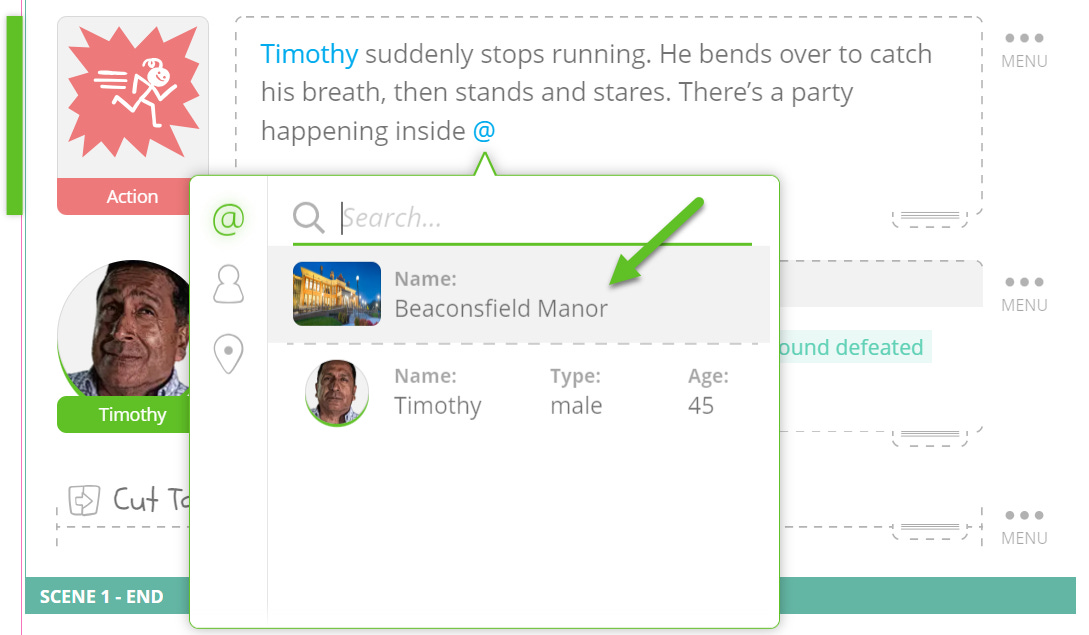
With Quick Add, tagging characters and locations is a breeze. Whenever you need to identify a character or location in your dialogue or action, use the '@' symbol, type a few letters to narrow your results until the right character or location is selected, and then hit enter/return to complete the mention.
Why should you bother mentioning characters and locations in your action and dialogue?
Mentioning characters and locations will make updating character and location names throughout your story automatic. For example, if you decide to update a character's name or a location, every tagged mention of the character or location throughout your story will be updated. This feature is designed to make your writing and editing process as smooth and efficient as possible!
Creating New Characters and Locations Using '@'
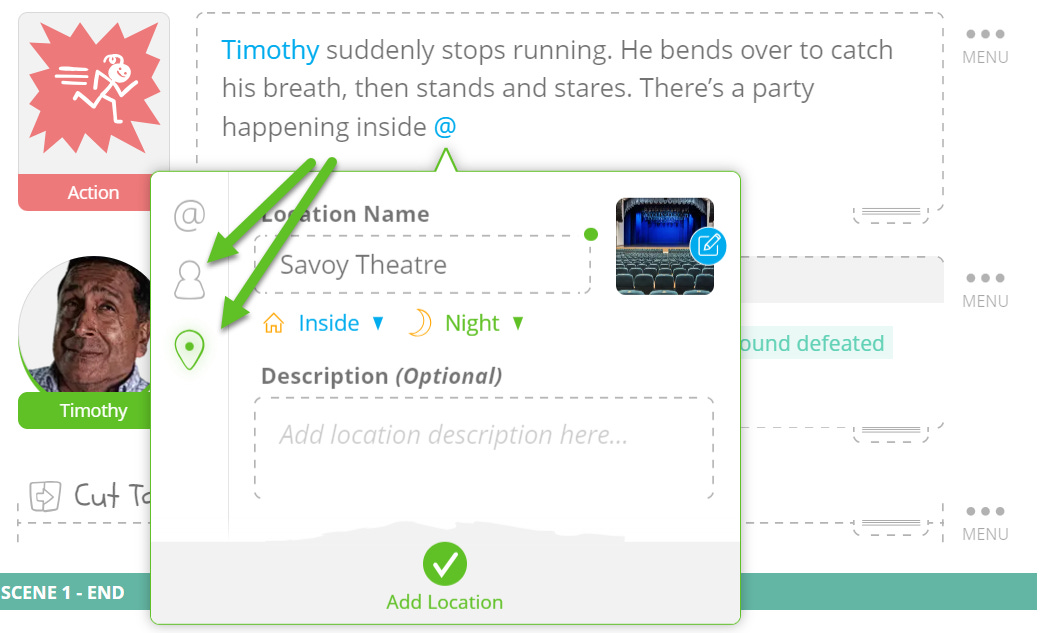
Creating new characters or locations is just as easy. Type the '@' symbol, and then simply tab to the character or location panes, type in the new name, and hit enter/return. It’s really that easy.
When you are done, your newly created character or location will appear in your Story Toolbar to the left of your Story Stream. Just click the character or location you want to use to insert them into your story stream right below the green Focus Indicator.
This feature makes populating your narrative world simpler and faster than ever!
Exploring This Week’s Featured Blogs
Crafting Compelling Character Descriptions: Are you striving to craft characters that captivate and linger in your audiences’ minds? Learn how to introduce characters compellingly and informatively with this insightful blog post that shares real screenplay character description examples. Dive in and enrich your character-writing skills here.
What Does a Podcast Producer Do?: Want to see what a day in the life of a podcast producer looks like? Producer Jeffrey Crane Graham lets us into his world to show us his unique role, responsibilities, and the behind-the-scenes magic of a Podcast Producer. See if the job’s right for you.
Understanding First, Second, and Third Person Points of View: Ever found yourself grappling with narrative perspectives in your writing? Here's a comprehensive guide to understanding and effectively implementing the first, second, and third-person points of view in your screenplay. Learn more here.
Try SoCreate, the more visual and fun way to create a professional script!
SoCreate Feature Highlight: Exporting & Printing Your SoCreate Story

In conventional screenwriting software, the creative process is confined to the limits of a traditional format. The writer is left to imagine characters, locations, and interactions within a somewhat rigid and uncreative structure.
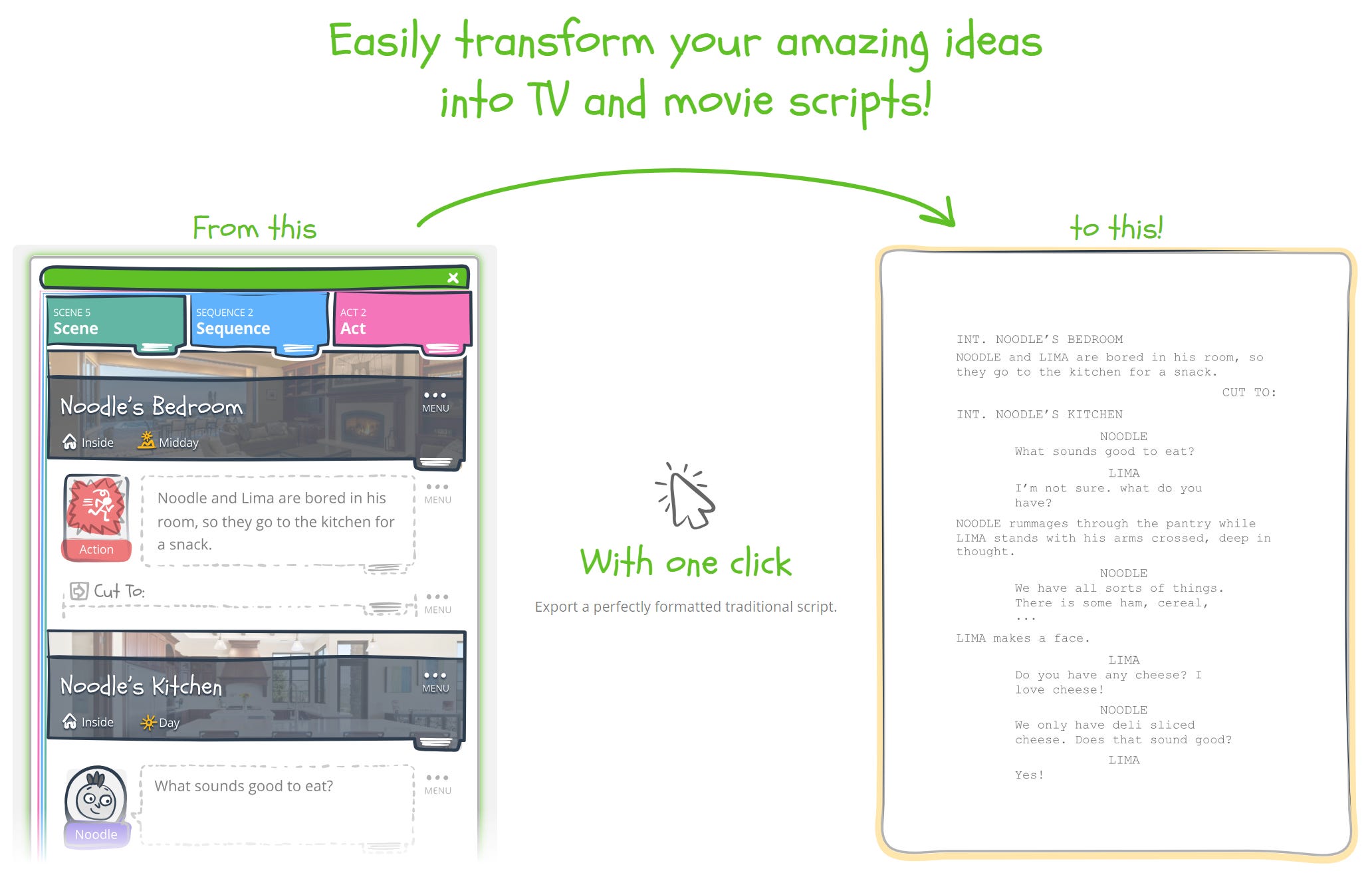
But in SoCreate, you're freed from these constraints. You write in our engaging, visual, and interactive Story Stream, where characters and locations come alive. You don't need to be versed in traditional screenwriting format, yet with just a click, you can export and print your screenplay in a Hollywood-ready, professional format that industry professionals expect.
Why is SoCreate’s Export and Print Feature Better?
With SoCreate, you can preview what your script will look like in the traditional format and export your story directly to Final Draft (FDX), PDF, or SoCreate Backup file format at any time.
Exporting to an FDX file allows seamless collaboration if your writing partner still uses traditional software like Final Draft or if you’re required to deliver your screenplay in this format.
You can also export your script to PDF, print it, or save it as a SoCreate Backup File, which retains all the character and location images, data, and tags when re-imported into SoCreate.
SoCreate's export and print feature streamlines the whole process, providing flexibility to share your work, conduct a table read, or review your script offline without being confined to writing in the uninspired traditional screenplay format.
By giving you the ability to bring your digital story into the physical world, you get to view your work from different perspectives.
SoCreate Weekly Writing Challenge
Get ready to flex your creative muscles with SoCreate's weekly writing challenges. We provide a fresh and inventive prompt each week, pushing you to explore new dimensions in your writing.
This week's prompt:
Location: INT – Subway Station – Night
Characters: Felipe; Joan
Scene Description: Felipe and Joan bolt down the stairs into a seedy subway station. Lights flicker, and it’s dead empty.
Prompt: Create a gripping scene that features Felipe and Joan in the subway station, desperately trying to escape from an unseen entity. The real challenge? The audience can't see what's chasing them, only the characters' reactions. This prompt is your chance to demonstrate your ability to build suspense and elicit emotion solely through your characters' reactions and dialogues.
WEBINAR: Embark on a Writing Escape with SoCreate!
Feel like escaping into a world of creativity? You’re invited to our upcoming webinar, Writing Escape with SoCreate - not just a showcase of our screenwriting software but a creative sanctuary designed to ignite your storytelling spark.
Here's what's in store:
Find Writing Buddies: Chat and connect with global writers. Share ideas and join a vibrant community of creatives like you.
Meet the Minds: Catch up with our founder, Justin Couto, and the SoCreate team working hard to make writing easier for you. Draw inspiration from their stories, insights, and writing exercises.
Sneak Peek into SoCreate: Discover how our software can simplify and enliven your writing process. Find joy in writing again!
Even if the industry is on pause, your creativity needn't be. Let's make the most of this intermission together by creating creative space with SoCreate!
Ready for your creative escape? Reserve your spot for our live webinar Thursday, August 17, at 4 p.m. - 5 p.m. PST.
*All attendees will receive webinar-only pricing on SoCreate’s annual plan.*
As we accompany you on your screenwriting journey, remember that creativity isn't a destination—it's an exhilarating path filled with exploration, expression, trials, victories, and, most importantly, joy! Continue to explore, learn, and write in a style that's uniquely yours.
Until next week,
<3 Your friends at SoCreate
Try SoCreate, the more visual and fun way to create a professional script!